


The Hubbler product
One platform.
Every business app.
Hubbler is a unique SaaS product company that assists enterprises in managing, digitizing, automating, and optimising business processes with ease. Their no-code, DIY platform allows users to build powerful, customizable digital business applications with user-friendly automation solutions. With the ability to build native web and mobile apps in as little as an hour, configuring apps is as simple as building with Lego blocks, using drag and drop components within a framework.
Your apps, app logo, actions and rules
Create an app, design each stage, then wire its buttonsEvery stage leaves a trail
Client details and conclusion cards show who assigned, withdrew or updated a record, with comments, due dates and tags, so a team always knows where an order stands.
“Waiting for clients replay. Will close this as soon as I get a reply.”
Know where the field team is
Manager can get to know where his team are currently and for the team who are on the field, it helps them to claim the fuel and other expenses that occurred during the business trip.

Attendance
This is one of the standard apps. User can swipe the start button to the left to start the attendance and swipe right to stop the attendance. We got in the swipe feature as the user should not accidentally start/stop attendance.
Leave
Users can apply for leave and Manager can approve it on the go. Also, managers and team members can see upcoming holidays and their leave balance.
User management
The people console lets admins add users, set managers and reportees, organise circles and custom fields, and see the whole organisation as a team tree.
Member Connect
Post photos, videos. Share special moments with your network. Bring camaraderie among members with various opportunities and topics for intriguing discussions. This makes the conversations genuine, relevant and brings back active and inactive members.
How we got there
Introducing UX design process and design thinking
My design process

User research
As a UX designer at a startup, I communicated with both customers and end-users through regular calls, and conducted client visits to better understand their needs and behaviors. This approach enabled me to create user-centric designs and build strong relationships with stakeholders for effective collaboration throughout the project.
Using the above methods, I gathered insights to identify common user characteristics, behaviors, and pain points. With these insights, I created a persona representing our target audience and integrated their needs and goals into our design decisions.

As someone who makes critical decisions related to the management, operation, and growth of the business, a business owner needs to have a comprehensive understanding of the company's overall performance. To support them in this role, custom reports, highly actionable dashboards, performance metrics, and leaderboards can be incredibly valuable. Access to critical business-related data should be readily available to the business owner, ensuring that they have a bird's eye view of the company's performance and are able to make informed decisions based on this information.

Team managers are accountable for managing the entire team. They need to be able to assign tasks, review team performance, and address any requests from team members. Additionally, they should be capable of completing their own tasks and generating reports on their team's performance. However, typically their visibility is limited to their own team members only.

Executives are typically positioned on the lower end of the hierarchy pyramid, and are responsible for completing tasks assigned to them. They tend to interact more frequently with applications and software to carry out their work. Since executives are often required to work in the field, they primarily rely on mobile devices to access these applications.

Administrators are typically responsible for setting up and maintaining the entire system within a company. The Hubbler team works closely with company administrators to assist them in uploading user data and providing training if necessary, to ensure that they are able to effectively utilize any applications.
Key findings
For almost all use cases, I work collaboratively with the PM and engage with end-users and stakeholders to derive key findings. After analyzing user personas, conducting interviews, and reviewing feedback, I will have a list of key findings. These key findings may include insights into the users' needs, preferences, pain points, and other important factors that influence their experience.

Insights
Next, I will categorize these key findings into different insights based on the type of information they provide. For instance, some key findings may suggest certain actions that can be taken to improve the user experience or resolve a problem. Other key findings may provide information that can help to better understand the user or the problem statement. Finally, some key findings may highlight areas where knowledge visibility could be improved, such as making certain features more prominent or improving the organization of information.
By categorizing key findings into these different insights, I can better understand how to use this information to improve the product or service, prioritize development efforts, and make data-driven decisions that align with user needs and preferences.
Information architecture
IA helps in organizing content so that users would easily adjust to the functionality of the product and could find everything they need without any efforts.

User flow
Using the above methods, I gathered insights to identify common user characteristics, behaviors, and pain points. With these insights, I created a persona representing our target audience and integrated their needs and goals into our design decisions.


Low fidelity wireframe
When creating lo-fi wireframes, I typically use simple tools like pen and paper, or digital tools such as Miro. These tools allow me to rapidly prototype, explore, and iterate on design concepts. This approach is effective for communicating ideas and concepts to stakeholders because lo-fi wireframes are easy to understand and don't require advanced design skills or software to create.

Design iterations
Early App Studio on web and the first Attendance app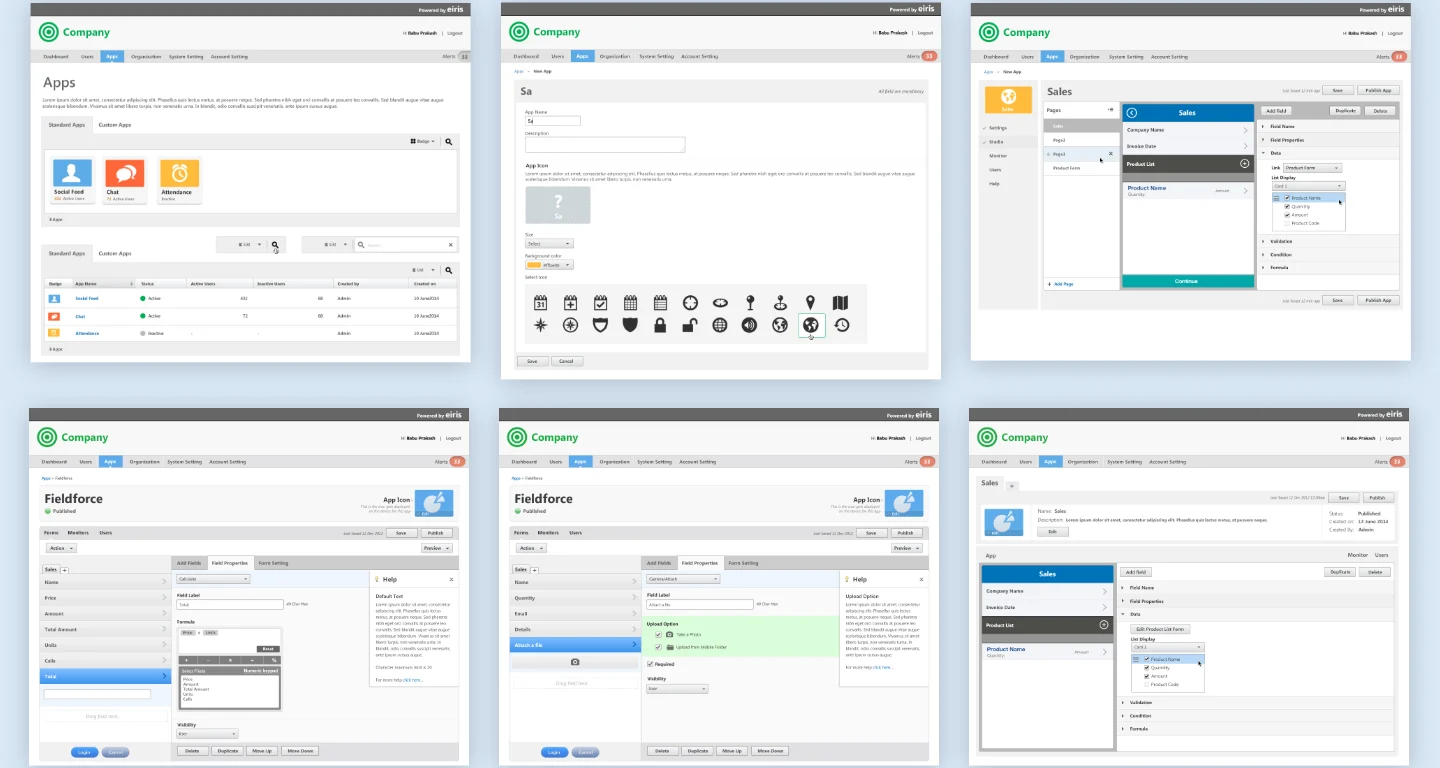

Usability testing
Having regular demos help me keep all the stakeholders, including the development team and management, up to date with the progress of the Hubbler features. This ensures that everyone is on the same page and can make informed decisions about the direction of the project.

A design system for three platforms
Developing a design system is a continuous and meticulous process that demands significant attention to detail. It encompasses the creation and documentation of a set of standards, guidelines, and best practices that can be employed consistently across all products and platforms. This includes the establishment of color palettes, typography, iconography, and layout grids, as well as the generation of reusable components and templates.


Build business apps like Lego blocks.
Hubbler: a no-code platform for enterprise workflows, on iOS, Android and the web.