 Engage
Make payments theengine for acquisitionand retention.
An end-to-end design of Razorpay's Issuing console: wallet programs, a five-step campaign builder, maker-checker funds and reporting. Razorpay built it and took it to market as Razorpay Engage.
- Client
- Razorpay
- Our role
- End-to-end product design
- Product
- Issuing console, launched as Razorpay Engage
- Platform
- Web dashboard for admins and program managers
We designed it. Razorpay built it, then sold it to the market.
Designed by Jijoo
Research, information architecture, flows and every final screen of the Issuing console, from login to reconciliation.
Built by Razorpay
Razorpay's engineers built the console on our designs: programs, campaigns, funds, accounts, applications and reports.
Marketed as Razorpay Engage
The engine now powers Engage's Loyalty Wallet, Gift Cards and campaign modules, sold as a "payments powered growth marketing suite". See Razorpay Engage ↗
Money in, rewards out, every rupee accounted for.
Before a single screen, we mapped how value moves: from a merchant's pool, through wallet programs and campaigns, into customers' wallets, and back out as spends, cashback and reports.
The whole programme, on one page.
Sign in once and the Issuing dashboard tells the full story, top to bottom. Scroll to read it.
- User growth and activation
- Transacting users and value
- Account financials
- Merchant pool funds
- Campaigns and demographics
- Gift card issuance and breakage


Four kinds of wallet, one console.
White-labelled wallets, small and full prepaid instruments, and gift cards share one structure: the same overview, the same growth charts, the same campaign table. Learn one, run them all.


Write the rule. Someone else approves it.
A reward rule reads like a sentence. Every change to a program goes to a second person for review before it reaches a single customer.
Transaction amountis equal to or above₹500→3% cashbackup to₹1,000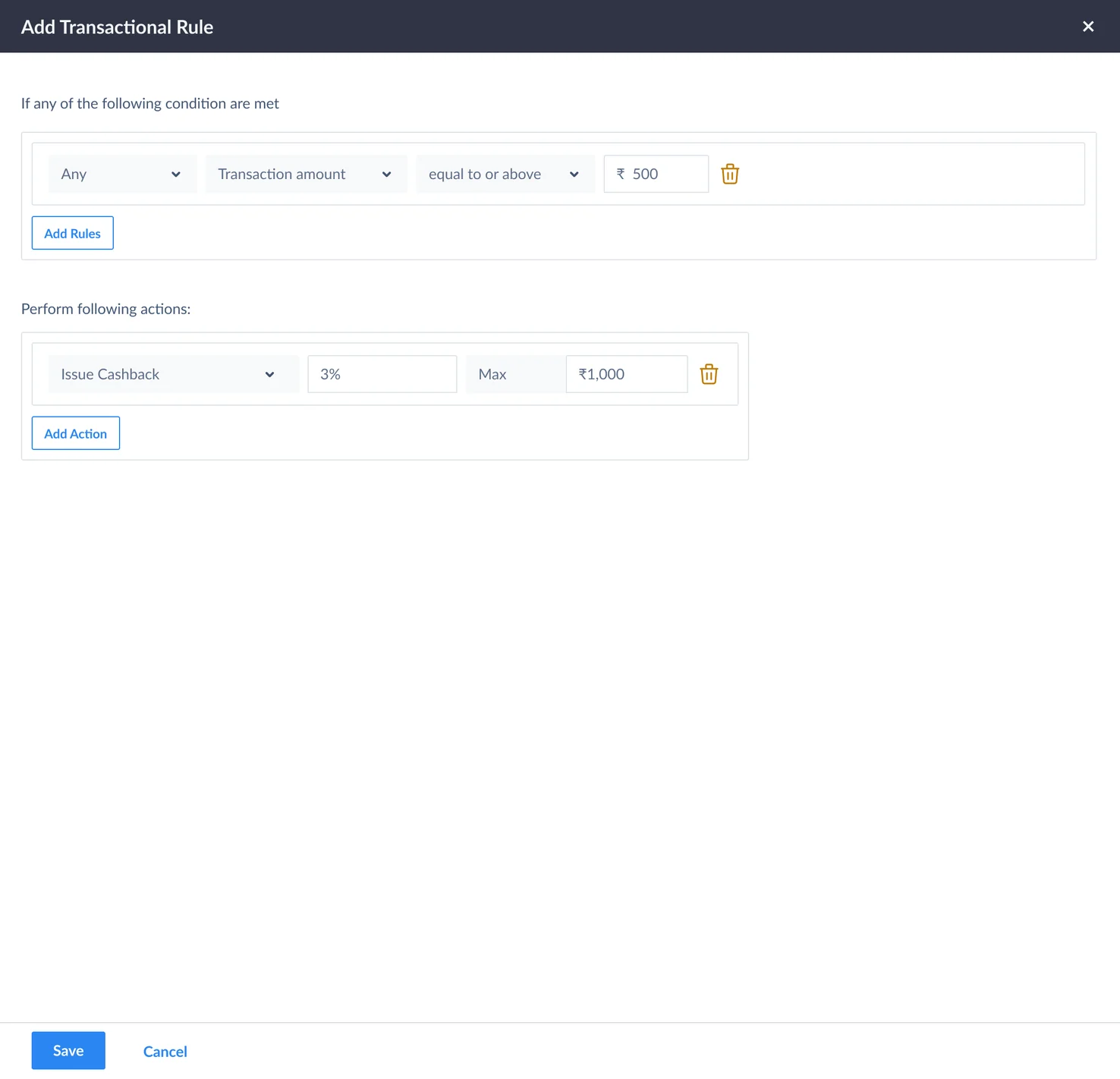


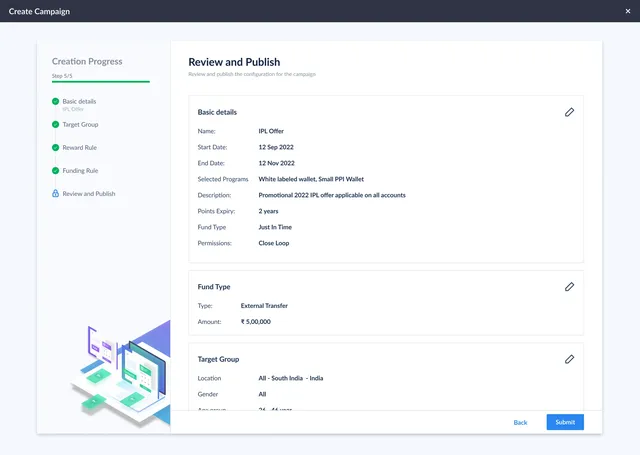
From idea to live campaign in one guided flow.
- 1Campaign details
Name and dates, the programs it runs on, points expiry and fund type: just-in-time or pre-paid.
- 2Funding rules
Allocate the campaign's budget from an available fund.
- 3Target group
Upload a CSV of accounts, or choose target parameters.
- 4Reward rules
Transactional, relationship and event rules, each with its own reward and cap.
- 5Review and publish
Every decision on one page, editable in place, before anything is submitted.
- 6Test and validate
Run a dummy transaction file through the rules before a single customer sees them.
- 7Approve
A second approver signs off, and the campaign goes live.


Every campaign, measured as it runs.
The campaigns list shows budget against target at a glance. Open one and the numbers that matter come first: days left, budget, spent and pool balance.


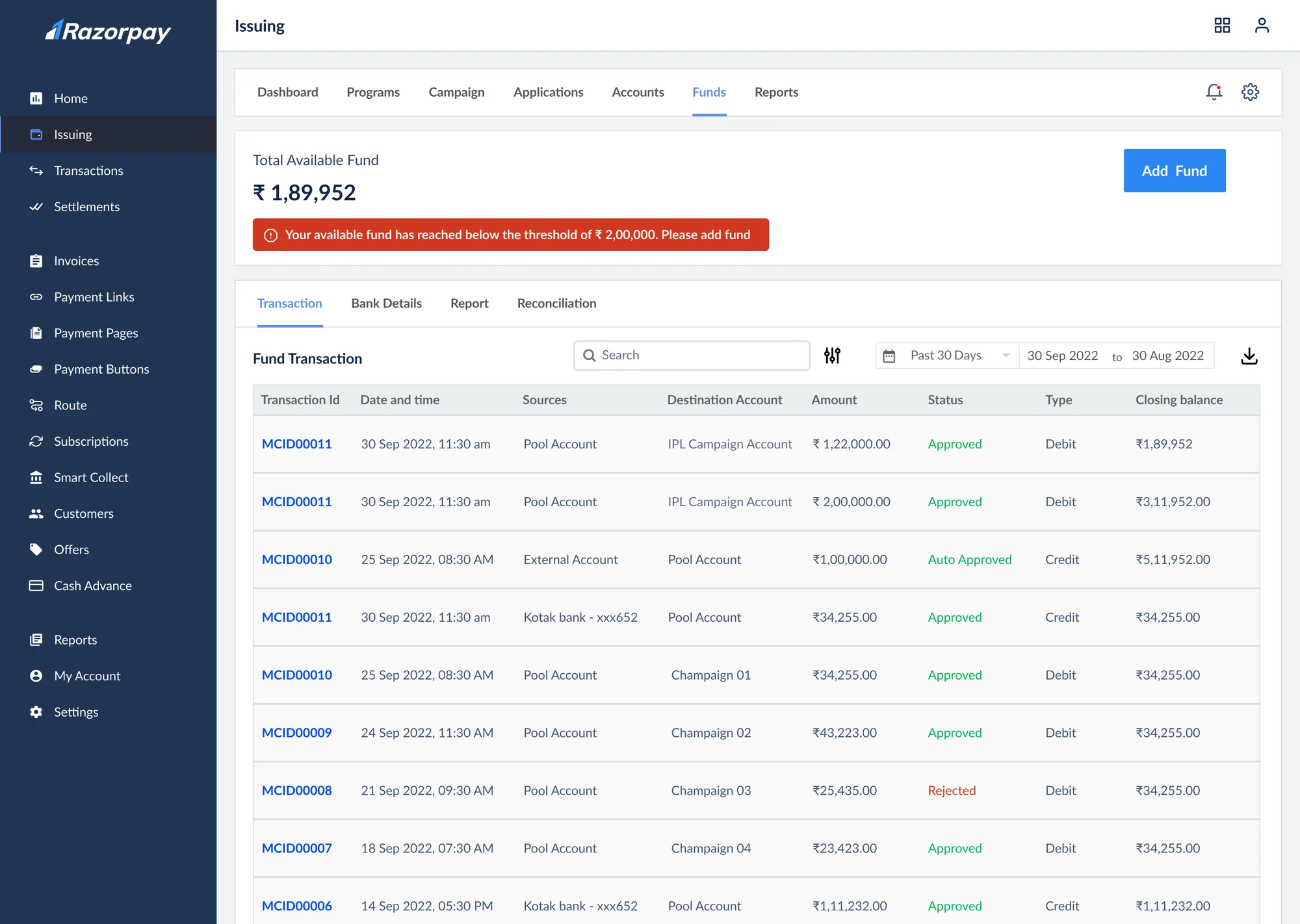
Two keys for every rupee.
- Move moneyAn executive starts a ₹2,00,000 transfer from the pool to the IPL campaign account.
- Request #11493It waits as a request with the program manager, with the full trail attached.
- ApprovedThe program manager approves; the transfer completes.
- Everyone knowsApprovals and rejections land in notifications, with amounts and campaigns.


When a pool runs low, the console says so.
A red banner flags a fund that has fallen below its threshold, right where the balance sits, so campaigns never stall for lack of money.
The quiet screens that run the business.
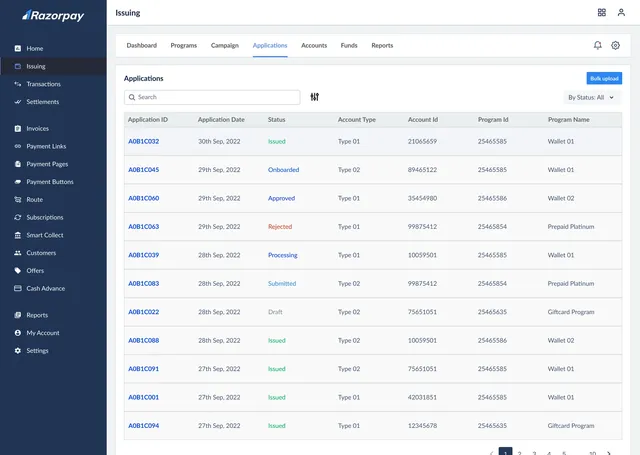
Accounts, applications and reports: the tables operations teams live in all day, designed to scan fast and filter faster. Click any screen to see it full size.
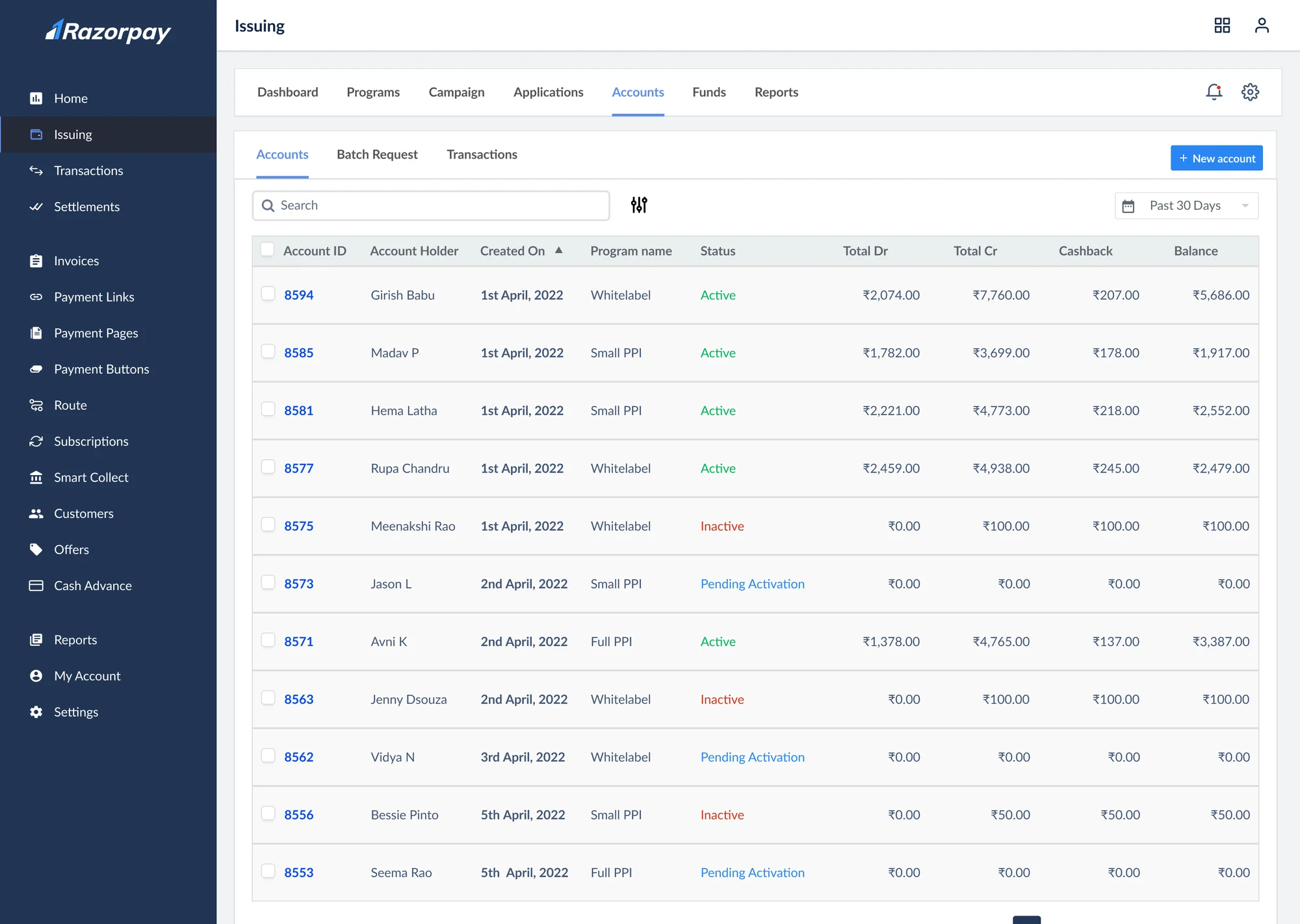
Accounts
Every wallet account, its program, status and balance.

Applications
New applications and their status, from issued to rejected.

Reports
Ready-made reports for spend, cashback and reconciliation.
Designed for the people we already knew.
Engage serves the same people as our Gift Cards Management System for Razorpay: Razorpay admins, client program managers and the executives who run campaigns day to day. The research we did there shaped every decision here.

I am dedicated to leveraging the platform to streamline gift voucher management, ensuring a smooth and efficient process for all involved.
A seasoned product manager with over 10 years of experience in e-commerce. She runs the programs, signs off the money and answers for the numbers.
Tasks
Challenges
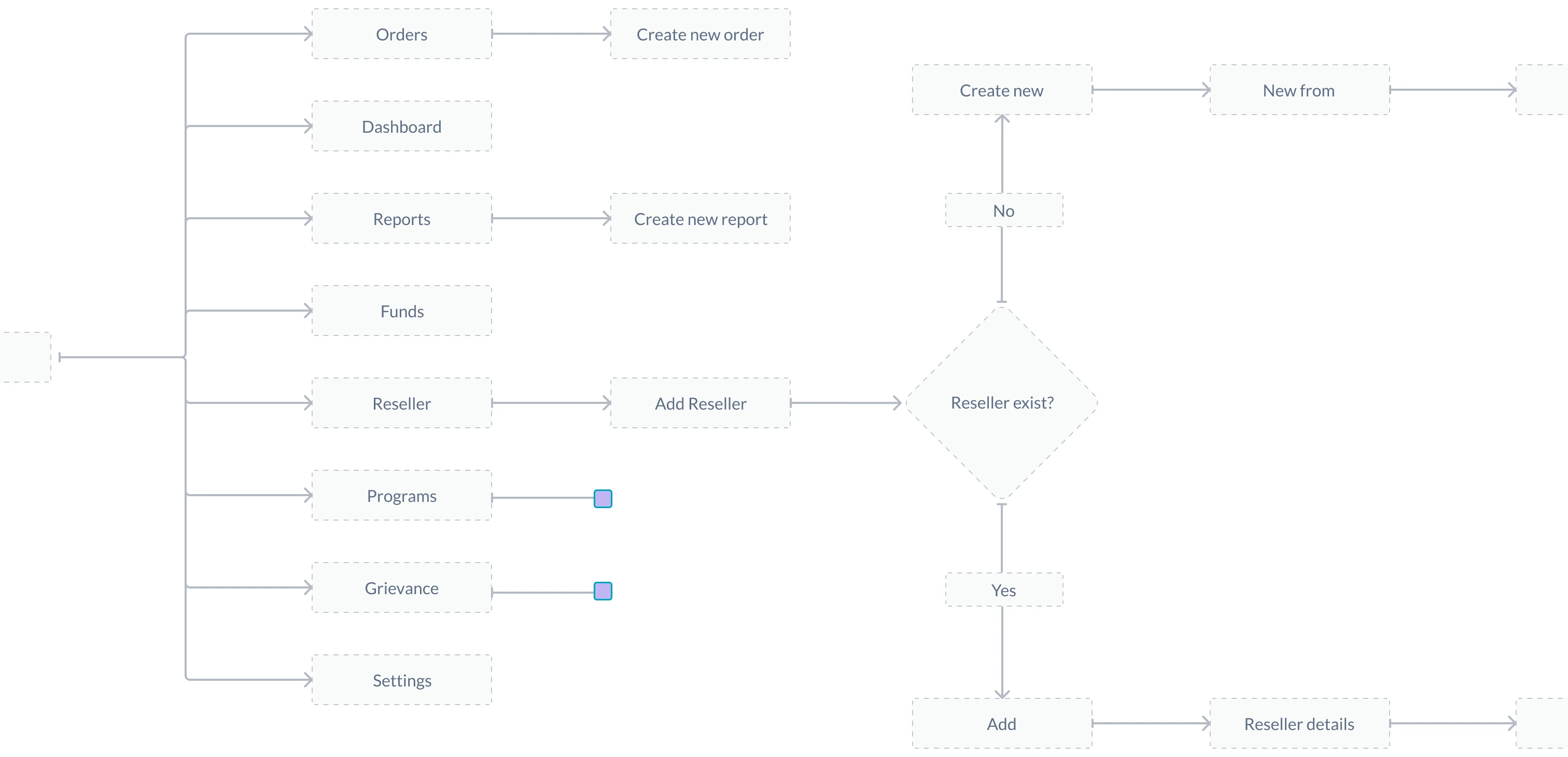
Every state, every edge case, designed.






Where our screens went next.
Razorpay took the engine to market as Razorpay Engage. Three of its modules rest on what we designed. The bullets below are Razorpay's own words.
Loyalty Wallet
- “Streamline refunds, rewards & gift cards all on one platform”
- “Automate reports & reconciliation”
Built on our wallet programs, funds and reports
Gift Cards
- “Define rules for issuance & management”
- “Access detailed insights and analytics”
Built on our gift card program and dashboard
Contextual Marketing Suite
- “Create, execute & optimise campaigns end-to-end”
- “Hyper-targeted transaction-led promotions”
Built on our campaign builder and reward rules
Figures as published by Razorpay on razorpay.com/engage.
Thank you
The Razorpay Issuing console, designed end to end by Jijoo and brought to market by Razorpay as Engage.